
Website live chat
Add a live chat bubble to your website so visitors can message your team and get answers without leaving the page.
On this page
A Website inbox puts a chat bubble on your site so visitors can talk to your team in real time.
How it works
- You create a Website inbox in EngageOne. EngageOne gives you a short script for that inbox.
- You paste the script on your website.
- A visitor opens the bubble and sends a message. A new conversation appears in the inbox.
- Your agents reply from EngageOne. The visitor sees each reply in the widget straight away.
- If the visitor leaves and you know their email address, the conversation can continue by email.
Create a Website inbox
- Go to Settings → Inboxes → Add Inbox → Website.
- Fill in Website Name and Website Domain.
- Pick a Widget Color, then write a Welcome Heading and Welcome Tagline.
- Optional: turn on Enable channel greeting and write a greeting, and choose a Set Reply time (for example "In a few minutes").
- Select Create inbox.
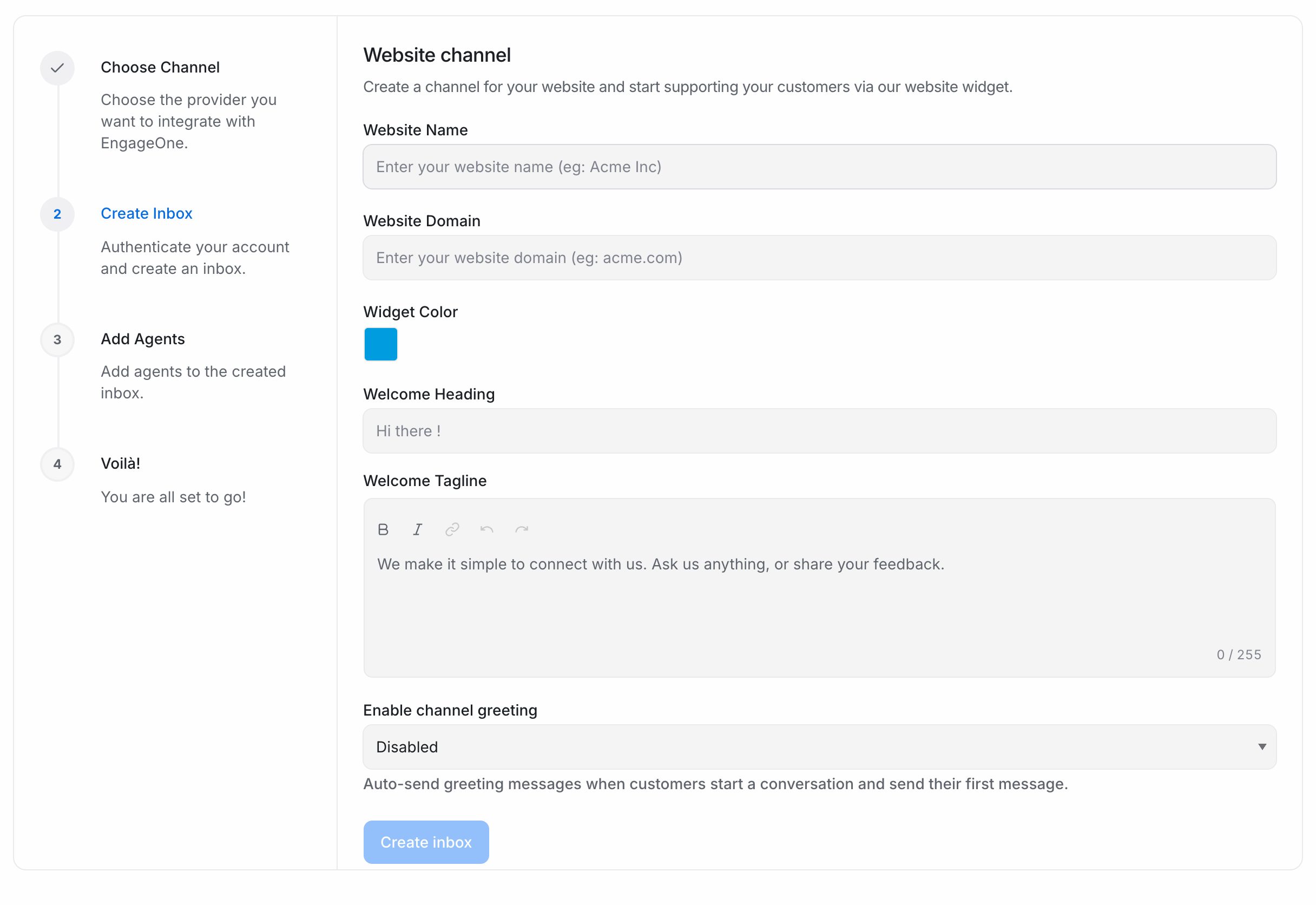
- Pick the agents who will answer chats and select Add agents.
- Copy the script shown on the last screen.
- Paste it just before the closing
</body>tag on every page where the chat should appear. - Open your website, send a test message and check that it arrives in the inbox.
Tip: You can copy the script again at any time from the inbox's page under Settings → Inboxes. Each inbox has its own script, so don't reuse one inbox's script for another site.
Inbox settings
Open Settings → Inboxes and select the inbox to change it later.
| Tab | What you set there |
|---|---|
| Settings | Name, color, welcome text, reply time, greeting, email collect box, conversation continuity via email, widget features |
| Collaborators | Agents and auto assignment |
| Configuration | Allowed Domains, Enable widget in mobile apps and Identity Validation |
| Business Hours | Opening hours, time zone and the out-of-office message |
| CSAT | Satisfaction survey after a conversation is resolved |
| Pre Chat Form | Fields the visitor fills in before the chat starts |
| Bot Configuration | Connect an agent bot |
What's supported
| Feature | Supported | Notes |
|---|---|---|
| Text messages | Yes | Both ways, in real time |
| File attachments | Yes | Turn on the file picker under widget features |
| Emoji picker | Yes | Turn on under widget features |
| Visitor ends the chat | Yes | Turn on under widget features |
| Pre-chat form | Yes | Ask for name, email, phone and custom fields |
| Greeting message | Yes | Sent automatically after the visitor's first message |
| Email collect box | Yes | Asks for the visitor's email if you don't have it yet |
| Conversation continuity via email | Yes | Replies go to the visitor's email when it is known |
| Identity validation | Yes | Your server signs the user's identifier with HMAC. Can be made mandatory |
| Allowed domains | Yes | Only the listed domains can load the widget |
| Mobile apps | Yes | Turn on Enable widget in mobile apps |
| CSAT surveys | Yes | Emoji or star rating |
Good to know
- If Allowed Domains is filled in, the widget only loads on those domains. Leave it empty to allow every domain.
- Mobile apps don't send a domain. If you embed the widget in an app and also use Allowed Domains, turn on Enable widget in mobile apps.
- When Require identity validation for all conversations is on, every logged-in user must be sent with a valid hash. Requests without one are rejected.
Important: Rotating the identity validation Secret Key revokes the old key at once. Update your server to sign with the new key first.
Troubleshooting
| Problem | Likely cause | Fix |
|---|---|---|
| The chat bubble doesn't appear | The script is missing or in the wrong place | Paste the script before </body> and reload. Check the browser console for errors |
| The widget is blank on one site | That domain isn't in Allowed Domains | Add the domain under Configuration → Allowed Domains |
| The widget is blank inside a mobile app | Mobile apps send no domain | Turn on Enable widget in mobile apps |
| Visitors can't start a chat | Identity validation is required but your site doesn't send a hash | Send the hash for logged-in users, or turn off the requirement |