
API channel
Build your own channel: send customer messages into EngageOne with the Client API and receive agent replies on your server through signed webhooks.
The API channel lets your own app or backend send customer messages into EngageOne and receive agent replies, so you can offer support in any channel you build.
How it works
- You create an API inbox and give it a Webhook URL on your server.
- Your app creates a contact and a conversation through the Client API, using the inbox's Inbox Identifier.
- Your app posts the customer's messages. They appear in EngageOne as incoming messages.
- An agent, or a bot, replies in EngageOne.
- EngageOne sends the reply to your Webhook URL as a
message_createdevent. Your server shows it to the customer.
Important: EngageOne doesn't deliver replies to the customer itself. Your server must receive each webhook and pass the reply on.
Create an API inbox
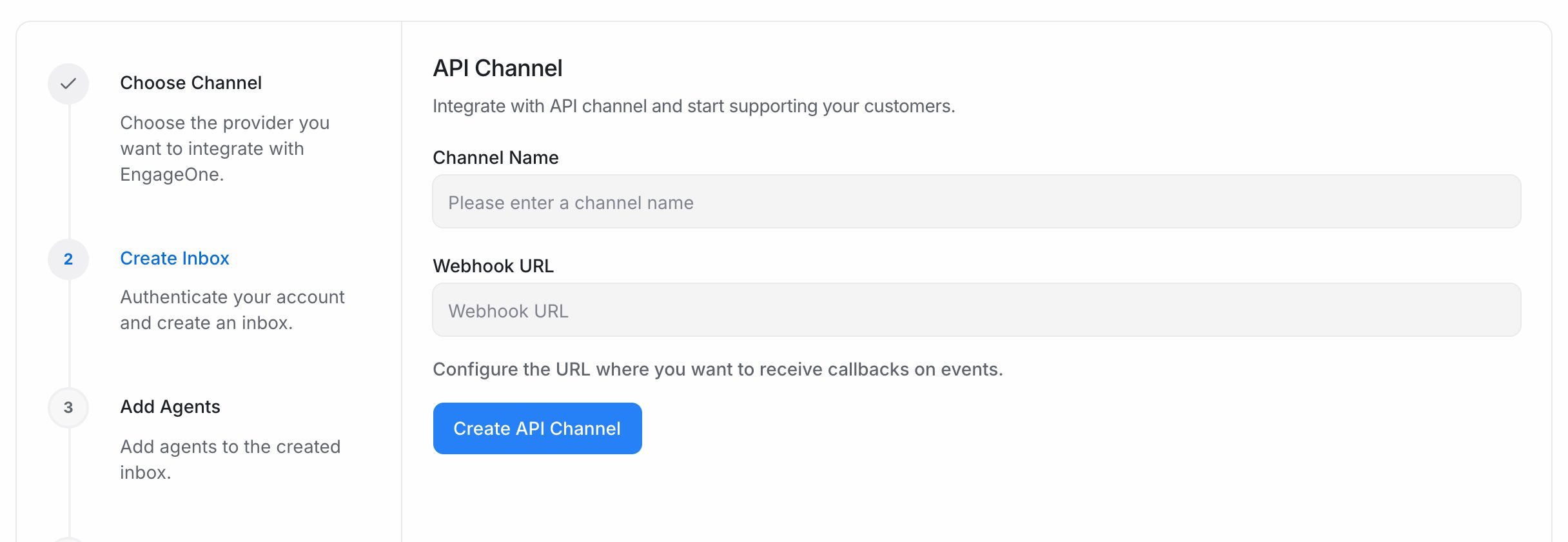
- Go to Settings → Inboxes → Add Inbox → API.
- Enter a Channel Name and the Webhook URL where your server will receive events.
- Select Create API Channel, then pick your agents and select Add agents.
- Open Settings → Inboxes, select the new inbox and go to the Configuration tab.
- Copy the Inbox Identifier. Your app uses it in every Client API call.
- On the same tab, note the User Identity Validation key. Turn on Enforce User Identity Validation if every contact must be verified.
- In the Settings tab, copy the Webhook Secret. Your server uses it to check webhook signatures.
The Client API
The Client API is called by your app on behalf of the customer. All paths start with:
https://<your-engageone-domain>/public/api/v1/inboxes/<inbox_identifier>
| Method | Path | What it does |
|---|---|---|
POST |
/contacts |
Create a contact. Returns a source_id and a pubsub_token |
GET / PATCH |
/contacts/<source_id> |
Get or update the contact |
GET / POST |
/contacts/<source_id>/conversations |
List or start conversations |
GET / POST |
/contacts/<source_id>/conversations/<conversation_id>/messages |
List or send customer messages |
POST |
/contacts/<source_id>/conversations/<conversation_id>/toggle_status |
Resolve the conversation |
POST |
/contacts/<source_id>/conversations/<conversation_id>/toggle_typing |
Turn the typing indicator on or off |
POST |
/contacts/<source_id>/conversations/<conversation_id>/update_last_seen |
Mark messages as read |
Tip: Store the
source_idyou get when you create a contact. It identifies that contact in this inbox for all later calls.
Example: from new contact to first message
- Create a contact:
curl -X POST "https://<your-engageone-domain>/public/api/v1/inboxes/<inbox_identifier>/contacts" \
  -H "Content-Type: application/json" \
  -d '{"name": "Asha Patel", "email": "asha@example.com"}'
- Start a conversation with the returned
source_id, and note the conversationid:
curl -X POST "https://<your-engageone-domain>/public/api/v1/inboxes/<inbox_identifier>/contacts/<source_id>/conversations"
- Send the customer's message:
curl -X POST "https://<your-engageone-domain>/public/api/v1/inboxes/<inbox_identifier>/contacts/<source_id>/conversations/<conversation_id>/messages" \
  -H "Content-Type: application/json" \
  -d '{"content": "Hi, I need help with my order"}'
To send a file, post it as multipart form data with -F "attachments[]=@receipt.pdf".
Verify your users
To prove a contact is a real signed-in user, compute this on your server and send identifier and identifier_hash when you create or update the contact:
identifier_hash = HMAC-SHA256(key = <User Identity Validation key>, message = <identifier>), as hex
Important: Never put the User Identity Validation key in your app or website code. Compute the hash on your server.
Webhooks
EngageOne sends a POST request with a JSON body to your Webhook URL for these events:
| Event | When |
|---|---|
conversation_created |
A new conversation starts |
conversation_status_changed |
A conversation is opened, resolved, pending or snoozed |
conversation_updated |
A conversation changes, for example its assignee or labels |
message_created |
A message is added, incoming or outgoing |
message_updated |
A message changes |
conversation_typing_on / conversation_typing_off |
Someone starts or stops typing |
To show agent replies to the customer, handle message_created where message_type is outgoing and private is false.
Important: Webhooks also include private notes. Always skip messages where
privateistrue.
Check the signature
Each webhook carries three headers: a unique delivery ID, a timestamp and a signature. Their names end in -Delivery, -Timestamp and -Signature. Log one request from your inbox to see the exact names.
The signature header holds sha256= followed by the hex HMAC-SHA256 of <timestamp>.<raw body>, keyed with the inbox's Webhook Secret.
- Read the raw request body exactly as received. Don't parse and re-encode it first.
- Build the string
<timestamp header value>.<raw body>. - Compute HMAC-SHA256 of that string with your Webhook Secret, as hex, and add
sha256=in front. - Compare it with the signature header using a constant-time comparison.
- Reject requests with old timestamps, for example older than 5 minutes.
const crypto = require('crypto');

function isValid(rawBody, timestamp, signature, secret) {
  const expected = 'sha256=' +
    crypto.createHmac('sha256', secret).update(`${timestamp}.${rawBody}`).digest('hex');
  return expected.length === signature.length &&
    crypto.timingSafeEqual(Buffer.from(expected), Buffer.from(signature));
}
Delivery rules
- Each webhook is sent once and isn't retried.
- Your server should answer quickly with a
2xxstatus. By default EngageOne waits 5 seconds. - If a
message_createdormessage_updatedwebhook fails, that message is marked as failed in EngageOne.
Troubleshooting
| Problem | Likely cause | Fix |
|---|---|---|
404 on Client API calls |
Wrong Inbox Identifier, source_id or conversation ID |
Copy the Inbox Identifier from the Configuration tab and reuse the source_id from contact creation |
| "HMAC failed: Invalid Identifier Hash Provided" | Missing or wrong identifier_hash while validation is enforced |
Sign the exact identifier with the current key |
| No webhooks arrive | The Webhook URL is empty, wrong or not public | Check the URL in the Settings tab |
| Agent replies show as failed | Your server didn't answer in time or returned an error | Answer within the timeout with a 2xx status |
| The signature doesn't match | The body was re-encoded, or the wrong secret was used | Sign the raw body with the current Webhook Secret |
| Customers see internal notes | Your server shows every message_created event |
Skip messages where private is true |